Instalación del cliente Alpine Linux#
Diagrama de red#
| Diagrama de interfaces de red en VirtualBox |
|---|
 |
| 🟠 Red DMZ - Conexiones que se manejan en la red internal network de VirtualBox |
| 🔵 Red LAN - Conexiones que se manejan en la red host-only de VirtualBox |
| 🟢 Red WAN - Conexiones que se manejan en la red NAT Network de VirtualBox |
| 🔴 Red Externa - Conexiones que salen desde el equipo físico hacia Internet |
Descargar imagen ISO#
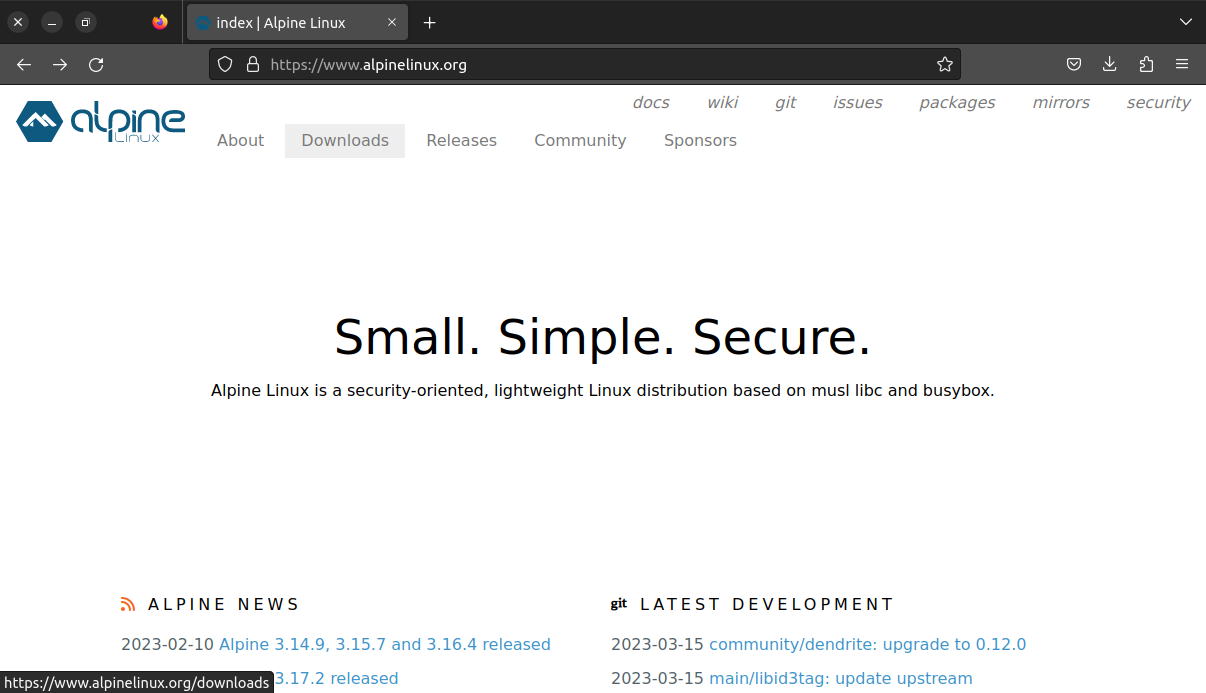
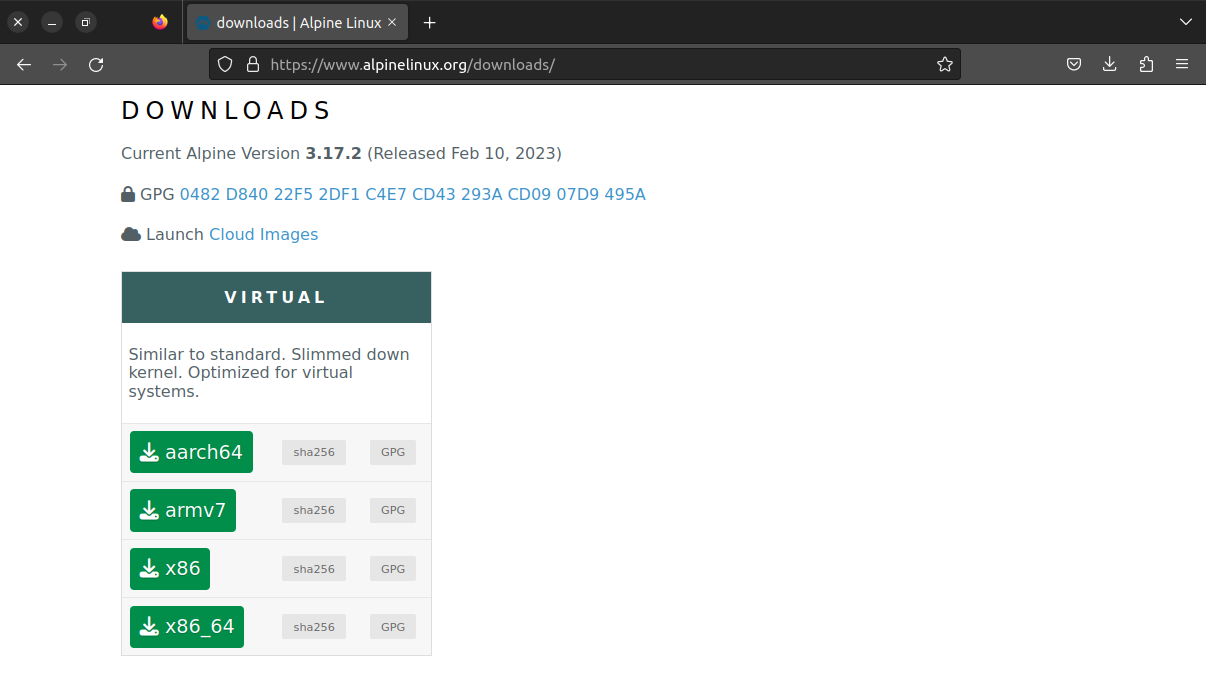
Descargar imagen ISO del sitio oficla de Alpine Linux
Descarga de imagen ISO virtual x86_64 de Alpine Linux |
|---|
 |
 |
 |
Crear máquina virtual#
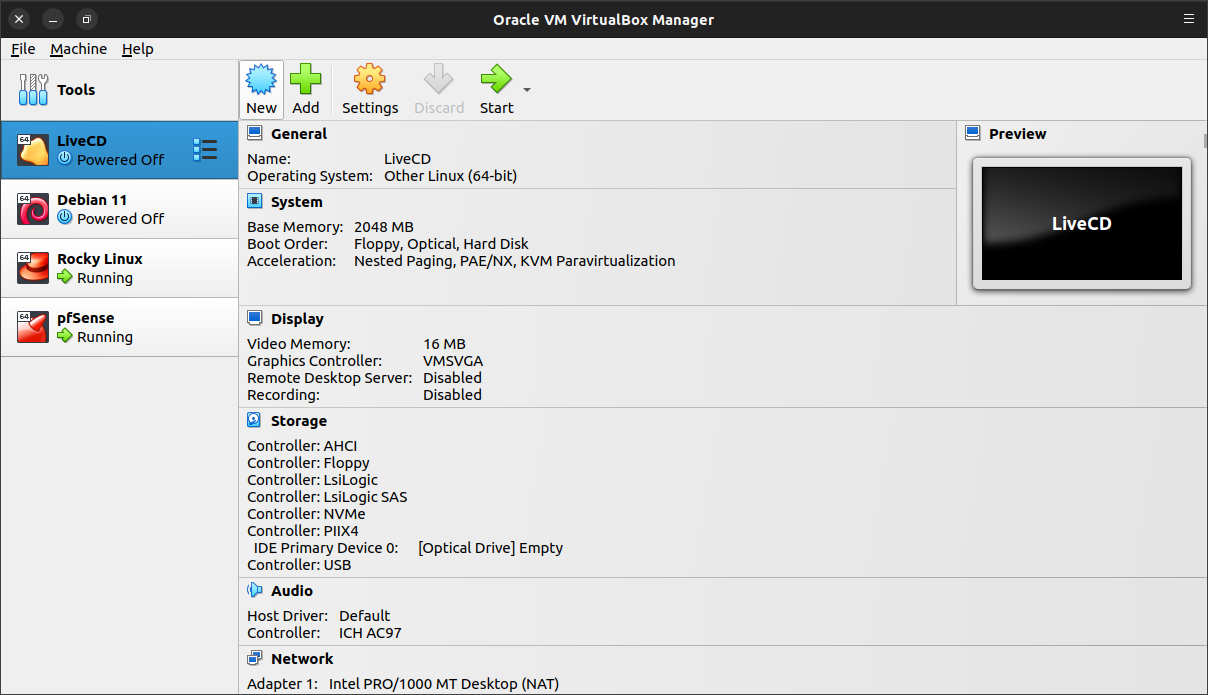
Crear una nueva máquina virtual en VirtualBox
| VirtualBox - Nueva máquina virtual |
|---|
 |
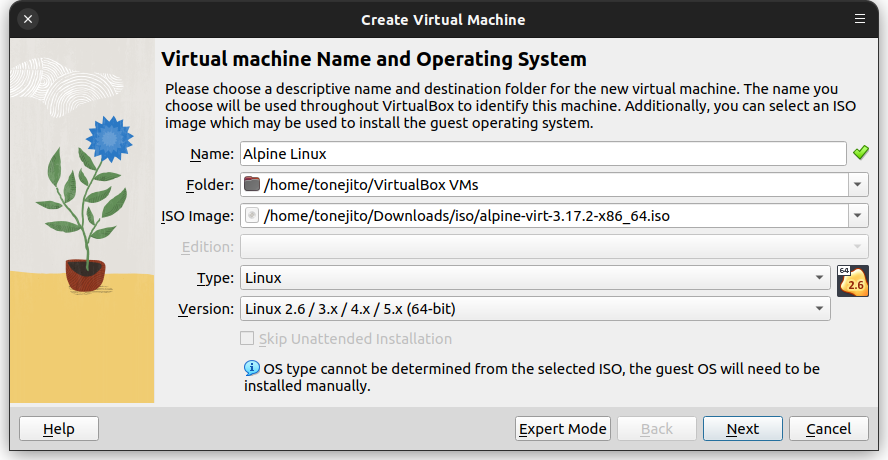
Asignar un nombre, el tipo de sistema operativo y ubicar la imagen ISO de instalación
| VirtualBox - Nombre, tipo e imagen de instalación |
|---|
 |
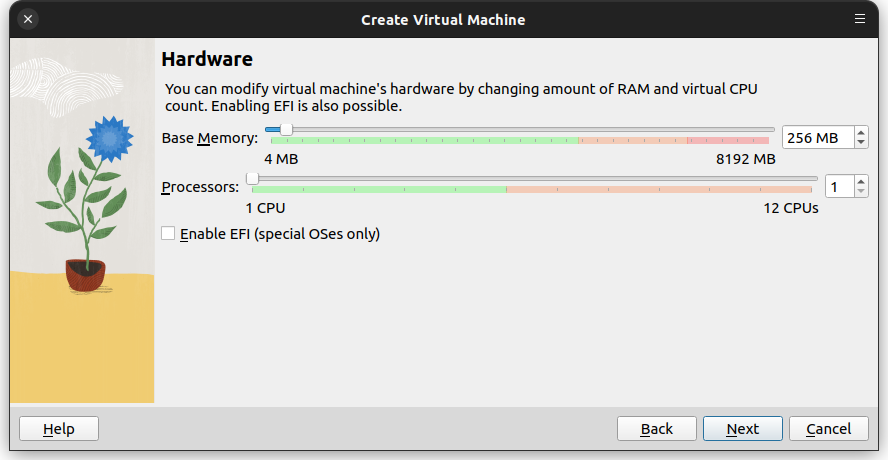
Asignar 256 MB de RAM y 1vCPU
| VirtualBox - RAM y vCPU |
|---|
 |
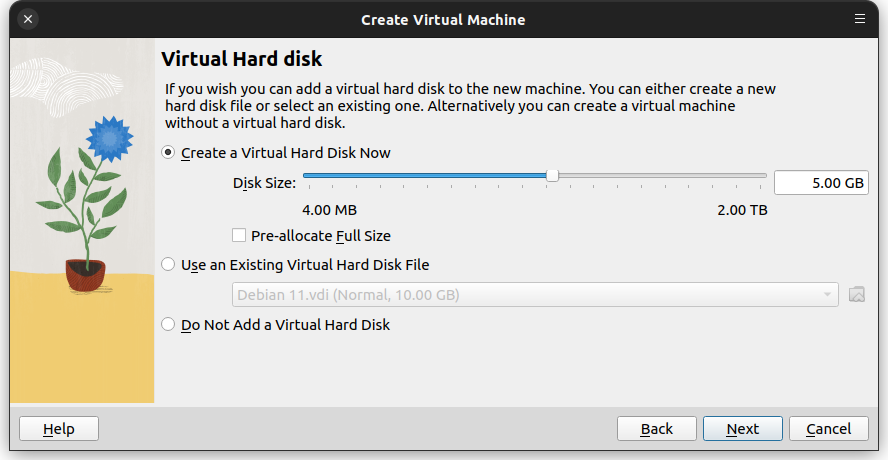
Asignar 5 GB de espacio en disco
| VirtualBox - Espacio en disco |
|---|
 |
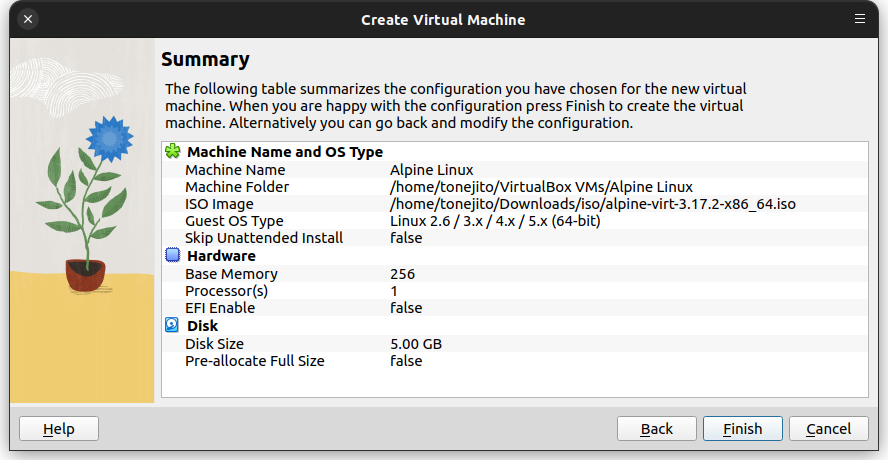
Confirmar la configuración de la máquina virtual
| VirtualBox - Resúmen de configuración |
|---|
 |
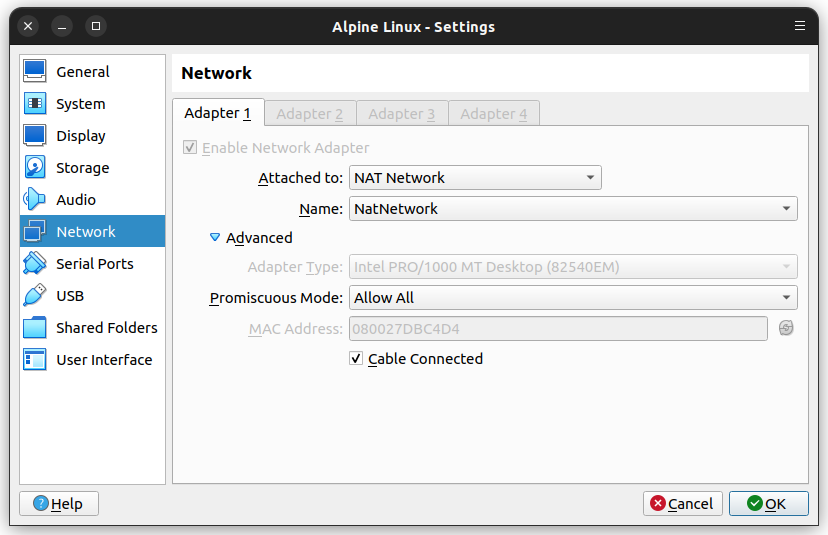
- Ingresar a los ajustes de la máquina virtual en la sección de red
- Cambiar el tipo de red a NAT Network
| VirtualBox - Configuración red NAT |
|---|
 |
Instalación de Alpine Linux#
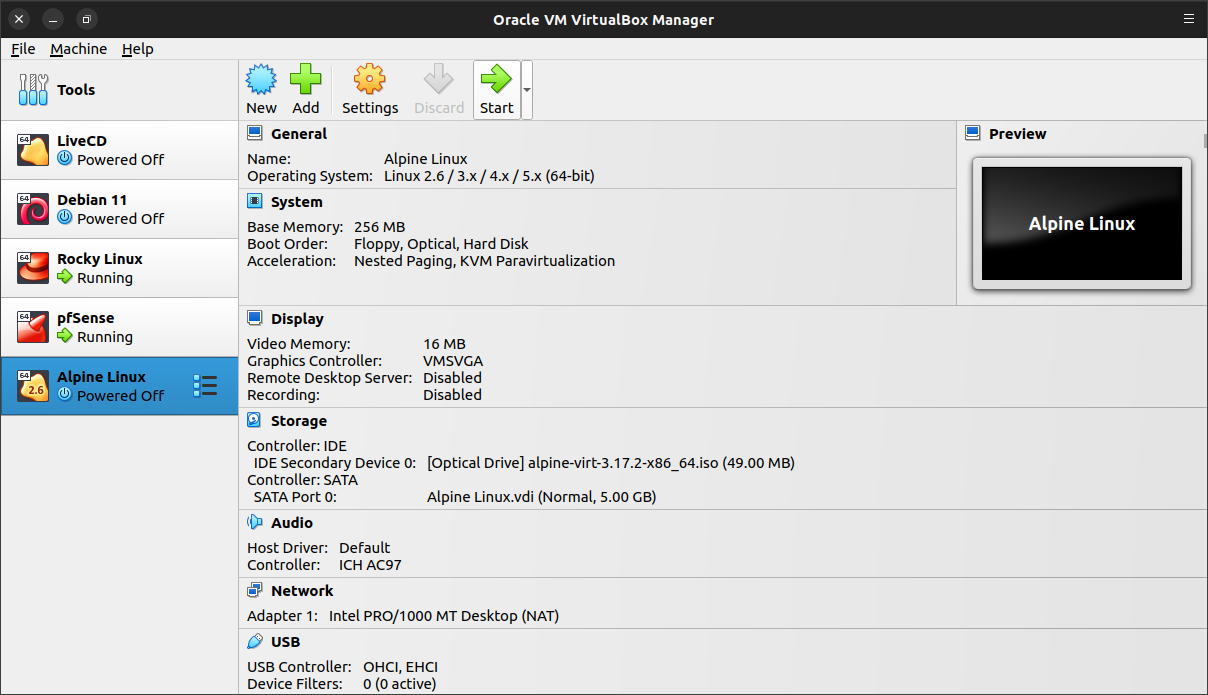
Iniciar la máquina virtual
| VirtualBox - Iniciar máquina virtual |
|---|
 |
 |
Esperar a que la máquina virtual inicie desde el LiveCD
| LiveCD de Alpine Linux |
|---|
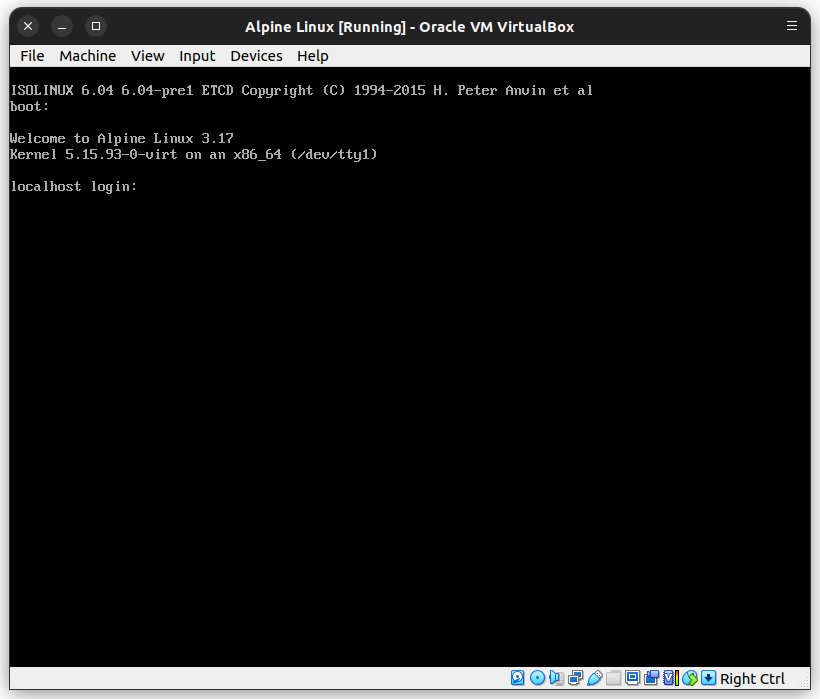 |
Iniciar sesión con el usuario root en el ambiente LiveCD
Note
El LiveCD de Alpine Linux no pide contraseña para el usuario root
``` Welcome to Alpine Linux 3.17 Kernel 5.15.93-0-virt on an x86_64 (/dev/ttyS0)
localhost login: root ⬅️ Welcome to Alpine!
The Alpine Wiki contains a large amount of how-to guides and general information about administrating Alpine systems. See https://wiki.alpinelinux.org/.
You can setup the system with the command: setup-alpine
You may change this message by editing /etc/motd. ```
Ejecutar setup-alpine#
Ejecutar el programa setup-alpine para iniciar el proceso de instalación
localhost:~# setup-alpine ⬅️
Nombre de host#
Ingresar el nombre de host alpine.local
Enter system hostname (fully qualified form, e.g. 'alpine.example.org') [localhost] alpine.local ⬅️
Configuración de red#
Configurar la interfaz de red eth0 (NAT Network)
``` Available interfaces are: eth0. Enter '?' for help on bridges, bonding and vlans. Which one do you want to initialize? (or '?' or 'done') [eth0] eth0 ⬅️
Ip address for eth0? (or 'dhcp', 'none', '?') [dhcp] dhcp ⬅️
Do you want to do any manual network configuration? (y/n) [n] n ⬅️ udhcpc: started, v1.35.0 udhcpc: broadcasting discover udhcpc: broadcasting discover udhcpc: broadcasting select for 10.0.2.4, server 10.0.2.3 udhcpc: lease of 10.0.2.4 obtained from 10.0.2.3, lease time 600 ✅ ```
Contraseña de root#
Establecer una contraseña para el usuario root
``` Changing password for root New password: alpine ⬅️ Retype password: alpine ⬅️
passwd: password for root changed by root ```
Configuración de tiempo y zona horaria#
Establecer la zona horaria America/Mexico_City
Which timezone are you in? ('?' for list) [UTC]	America/Mexico_City	⬅️
 * Seeding random number generator ...
 * Saving 256 bits of creditable seed for next boot [ ok ]
 * Starting busybox acpid	...	[ ok ]
 * Starting busybox crond	...	[ ok ]
Presionar <enter> para descartar la configuración de un proxy
HTTP/FTP proxy URL? (e.g. 'http://proxy:8080', or 'none') [none] ⬅️
Establecer el demonio de tiempo proporcionado por busybox
Which NTP client to run? ('busybox', 'openntpd', 'chrony' or 'none') [chrony]	busybox	⬅️
 * service ntpd added to runlevel default
 * Starting busybox ntpd	...	[ ok ]
Mirror de instalación#
Seleccionar el mirror dl-cdn.alpinelinux.org para descargar los archivos de instalación
``` Available mirrors: 1) dl-cdn.alpinelinux.org ... --More--
r) Add random from the above list f) Detect and add fastest mirror from above list e) Edit /etc/apk/repositories with text editor
Enter mirror number (1-71) or URL to add (or r/f/e/done) [1] 1 ⬅️
Added mirror dl-cdn.alpinelinux.org Updating repository indexes... done. ```
Crear cuenta de usuario normal#
Crear una cuenta de usuario normal y establecer su contraseña
Setup a user? (enter a lower-case loginname, or 'no') [no]	tonejito	⬅️
Full name for user tonejito [tonejito]	Tonejito	⬅️
Changing password for tonejito
New password:	alpine	⬅️
Retype password:	alpine	⬅️
passwd: password for tonejito changed by root
Enter ssh key or URL for tonejito (or 'none') [none]	⬅️
Instalar servicio SSH#
Seleccionar el demonio openssh para el inicio de sesión remoto
(1/1) Installing doas (6.8.2-r3)
Executing doas-6.8.2-r3.post-install
Executing busybox-1.35.0-r29.trigger
OK: 11 MiB in 27 packages
Which ssh server? ('openssh', 'dropbear' or 'none') [openssh]	openssh	⬅️
 * service sshd added to runlevel default
 * Caching service dependencies	...	[ ok ]
ssh-keygen: generating new host keys: RSA ECDSA ED25519
 * Starting sshd	...	[ ok ]
Particionar el disco#
Particionar el disco sda y utilizarlo para el sistema operativo (sys)
``` Available disks are: sda (5.4 GB ATA VBOX HARDDISK ) Which disk(s) would you like to use? (or '?' for help or 'none') [none] sda ⬅️
The following disk is selected: sda (5.4 GB ATA VBOX HARDDISK ) How would you like to use it? ('sys', 'data', 'crypt', 'lvm' or '?' for help) [?] sys ⬅️
WARNING: The following disk(s) will be erased: sda (5.4 GB ATA VBOX HARDDISK ) WARNING: Erase the above disk(s) and continue? (y/n) [n] y ⬅️ Creating file systems... Installing system on /dev/sda3: /mnt/boot is device /dev/sda1 100% ██████████████████████████████████████████████████████████████████████████ ==> initramfs: creating /boot/initramfs-virt /boot is device /dev/sda1
Installation is complete. Please reboot. ✅ ```
Finalizar instalación#
Apagar la máquina virtual para quitar la imagen ISO de instalación
localhost:~# poweroff ⬅️
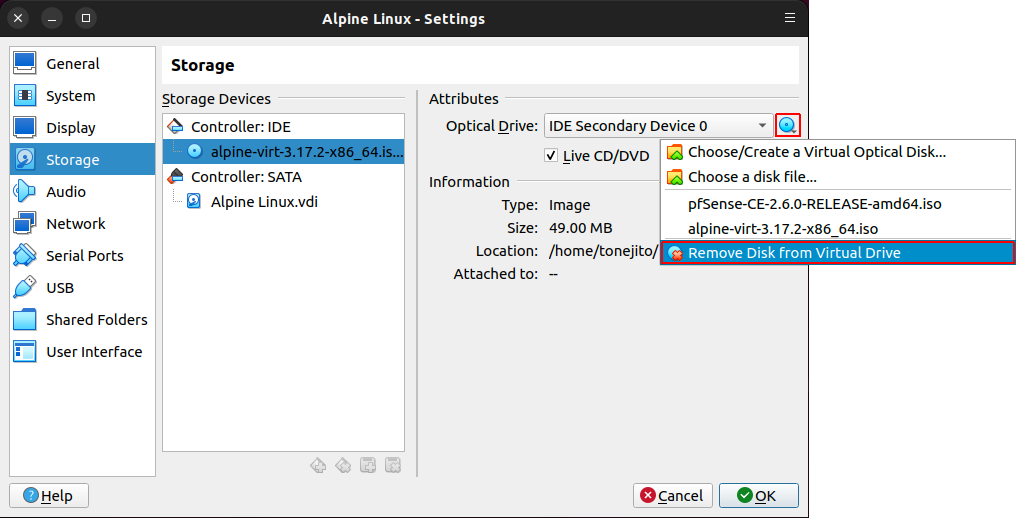
Remover la imagen ISO de instalación de la máquina virtual
| Remover imagen ISO |
|---|
 |
Configuración de Alpine Linux#
Iniciar la máquina virtual alpine
Iniciar máquina virtual alpine |
|---|
|
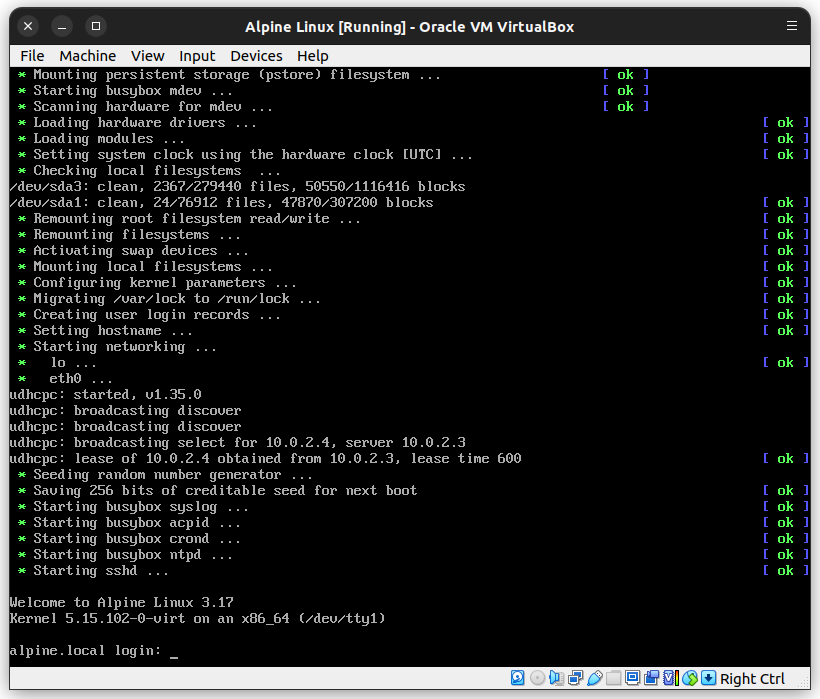
Espear a que el sistema operativo cargue e iniciar sesión como el usuario root
| Inicio de Alpine Linux |
|---|
 |
Parámetros de red#
Verificar los parámetros de red
``` alpine:~# cat /etc/network/interfaces auto lo iface lo inet loopback
auto eth0 ✅ iface eth0 inet dhcp ✅
alpine:~# ip addr
1: lo:
alpine:~# ip route default via 10.0.2.1 dev eth0 metric 202 ✅ 10.0.2.0/24 dev eth0 scope link src 10.0.2.4
alpine:~# cat /etc/resolv.conf search local nameserver 10.0.2.1 ✅ ```
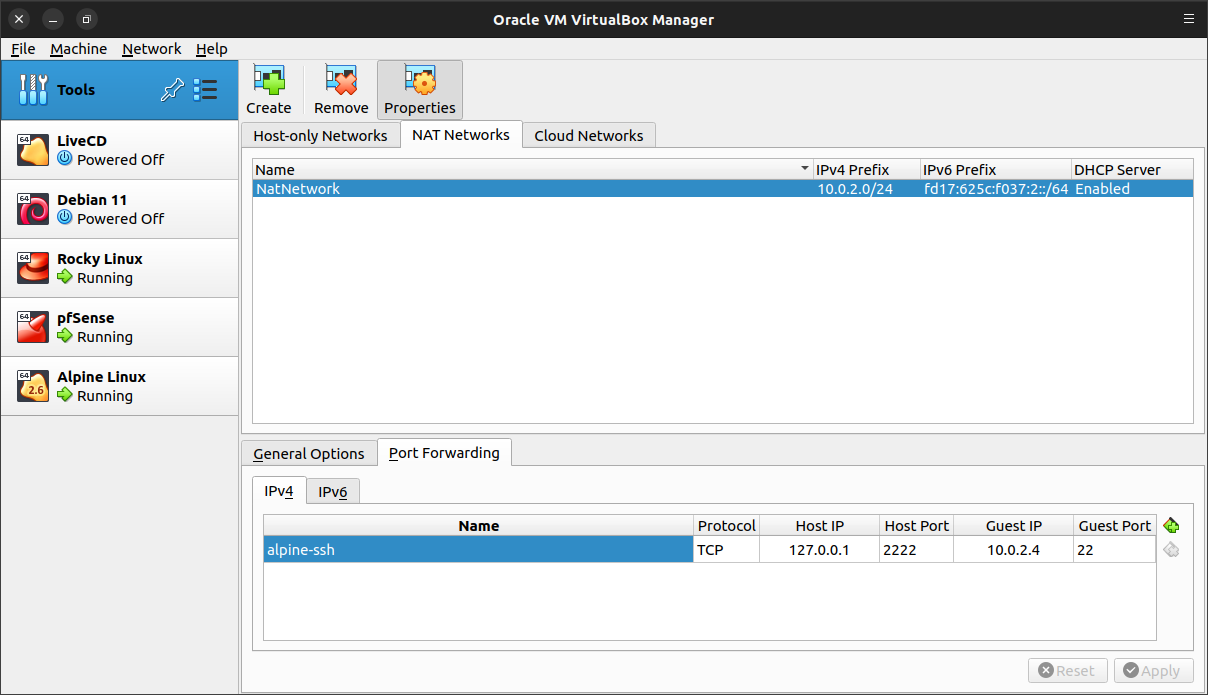
Crear redirección de puertos para SSH al host 10.0.2.4
| VirtualBox - Redirección de puertos NAT network |
|---|
 |
Verificar que el servicio de red ssh esté en ejecución y que el puerto 22 esté abierto
``` alpine:~# ps ax | egrep '^PID|sshd' | grep -v grep PID USER TIME COMMAND 1024 root 0:00 sshd: /usr/sbin/sshd [listener] 0 of 10-100 startups ✅
alpine:~# netstat -ntulp Active Internet connections (only servers) Proto Recv-Q Send-Q Local Address Foreign Address State PID/Program name tcp 0 0 0.0.0.0:22 0.0.0.0: LISTEN 1024/sshd [listener ✅ tcp 0 0 :::22 ::: LISTEN 1024/sshd [listener ✅ ```
Instalar software#
Actualizar la lista de paquetes
alpine:~# apk update
fetch http://dl-cdn.alpinelinux.org/alpine/v3.17/main/x86_64/APKINDEX.tar.gz
v3.17.2-199-g6a054f2aa38 [http://dl-cdn.alpinelinux.org/alpine/v3.17/main]
OK: 4990 distinct packages available
Instalar herramientas de diagnóstico en el sistema operativo
``` alpine:~# apk add wget curl (1/9) Installing ca-certificates (20220614-r4) (2/9) Installing brotli-libs (1.0.9-r9) (3/9) Installing nghttp2-libs (1.51.0-r0) (4/9) Installing libcurl (7.88.1-r0) (5/9) Installing curl (7.88.1-r0) (6/9) Installing libunistring (1.1-r0) (7/9) Installing libidn2 (2.3.4-r0) (8/9) Installing pcre2 (10.42-r0) (9/9) Installing wget (1.21.3-r2) Executing busybox-1.35.0-r29.trigger Executing ca-certificates-20220614-r4.trigger OK: 63 MiB in 69 packages
alpine:~# apk add bind-tools (1/10) Installing fstrm (0.6.1-r1) (2/10) Installing krb5-conf (1.0-r2) (3/10) Installing keyutils-libs (1.6.3-r1) (4/10) Installing libverto (0.3.2-r1) (5/10) Installing krb5-libs (1.20.1-r0) (6/10) Installing protobuf-c (1.4.1-r1) (7/10) Installing libuv (1.44.2-r0) (8/10) Installing libxml2 (2.10.3-r1) (9/10) Installing bind-libs (9.18.11-r0) (10/10) Installing bind-tools (9.18.11-r0) Executing busybox-1.35.0-r29.trigger OK: 75 MiB in 79 packages
alpine:~# apk add tcpdump (1/2) Installing libpcap (1.10.1-r0) (2/2) Installing tcpdump (4.99.1-r3) Executing busybox-1.34.1-r3.trigger OK: 7 MiB in 16 packages ```
Verificar que estén instaladas las herramientas en el sistema operativo
alpine:~# which ping traceroute dig wget curl openssl tcpdump
/bin/ping
/usr/bin/traceroute
/usr/bin/dig
/usr/bin/wget
/usr/bin/curl
/usr/bin/openssl
/usr/bin/tcpdump
Verificar conectividad a Internet#
Verificar la resolución de DNS
``` alpine:~# dig example.com. ⬅️
; <<>> DiG 9.18.11 <<>> example.com. ;; global options: +cmd ;; Got answer: ;; ->>HEADER<<- opcode: QUERY, status: NOERROR, id: 13532 ;; flags: qr rd ra; QUERY: 1, ANSWER: 1, AUTHORITY: 0, ADDITIONAL: 1
;; OPT PSEUDOSECTION: ; EDNS: version: 0, flags:; udp: 65494 ;; QUESTION SECTION: ;example.com. IN A
;; ANSWER SECTION: example.com. 7198 IN A 93.184.216.34 ✅
;; Query time: 0 msec ;; SERVER: 10.0.2.1#53(10.0.2.1) (UDP) ;; WHEN: Wed Mar 15 03:28:04 CST 2023 ;; MSG SIZE rcvd: 56 ```
Verificar la conectividad ICMP
``` alpine:~# ping -c 4 1.1.1.1 ⬅️ PING 1.1.1.1 (1.1.1.1): 56 data bytes 64 bytes from 1.1.1.1: seq=0 ttl=56 time=8.133 ms 64 bytes from 1.1.1.1: seq=1 ttl=56 time=7.573 ms 64 bytes from 1.1.1.1: seq=2 ttl=56 time=6.919 ms 64 bytes from 1.1.1.1: seq=3 ttl=56 time=7.784 ms
--- 1.1.1.1 ping statistics --- 4 packets transmitted, 4 packets received, 0% packet loss ✅ round-trip min/avg/max = 6.919/7.602/8.133 ms
alpine:~# ping -c 4 example.com. ⬅️ PING example.com. (93.184.216.34): 56 data bytes 64 bytes from 93.184.216.34: seq=0 ttl=55 time=11.498 ms 64 bytes from 93.184.216.34: seq=1 ttl=55 time=12.909 ms 64 bytes from 93.184.216.34: seq=2 ttl=55 time=14.226 ms 64 bytes from 93.184.216.34: seq=3 ttl=55 time=14.978 ms
--- example.com. ping statistics --- 4 packets transmitted, 4 packets received, 0% packet loss ✅ round-trip min/avg/max = 11.498/13.402/14.978 ms ```
Prueba de inicio de sesión remoto#
Verificar que el puerto 2222 de la máquina física esté aceptando conexiones y que se redirijan a la máquina virtual Alpine
``` tonejito@laptop:~$ nc -vz localhost 2222 ⬅️ Connection to localhost (127.0.0.1) 2222 port [tcp/*] succeeded! ✅
tonejito@laptop:~$ nc -v localhost 2222 < /dev/null ⬅️ Connection to localhost (127.0.0.1) 2222 port [tcp/*] succeeded! SSH-2.0-OpenSSH_9.1 ✅ ^C ```
Conectarse vía SSH al puerto de la máquina virtual Alpine que se redirigió en VirtualBox
``` tonejito@laptop:~$ ssh -p 2222 tonejito@localhost tonejito@localhost's password: alpine ⬅️ Welcome to Alpine!
The Alpine Wiki contains a large amount of how-to guides and general information about administrating Alpine systems. See https://wiki.alpinelinux.org/.
You can setup the system with the command: setup-alpine
You may change this message by editing /etc/motd.
alpine:~$ ✅ ```
Privilegios de usuario#
Elevar los privilegios a root utilizando el comando su
Warning
El comando su (switch user) pide la contraseña de root
alpine:~$ su -
Password:	alpine	⬅️
alpine:~#
Instalar sudo
``` alpine:~# apk add sudo (1/1) Installing sudo (1.9.12_p2-r1) Executing busybox-1.35.0-r29.trigger OK: 77 MiB in 80 packages
alpine:~# which visudo sudo /usr/sbin/visudo /usr/bin/sudo ```
Verificar que el usuario normal pertenezca al grupo wheel
``` alpine:~# id tonejito uid=1000(tonejito) gid=1000(tonejito) groups=1000(tonejito),10(wheel),18(audio),27(video),28(netdev) ✅
alpine:~# getent group wheel wheel:x:10:root,tonejito ```
Editar el archivo /etc/sudoers con visudo
alpine:~# visudo
Descomentar la línea que tiene la directiva NOPASSWD para permitir el uso de sudo sin contraseña para los miembros del grupo wheel
%wheel ALL=(ALL:ALL) NOPASSWD: ALL ✅
Listar los privilegios de sudo para el usuario normal
alpine:~# sudo -l -U tonejito
User tonejito may run the following commands on alpine:
    (ALL : ALL) NOPASSWD: ALL	✅
Abrir otra sesión con el usuario normal para verificar sus privilegios
``` alpine:~$ sudo -l User tonejito may run the following commands on alpine: (ALL : ALL) NOPASSWD: ALL ✅
alpine:~$ sudo -i alpine:~# ✅ ```
Note
- Continúa en la siguiente página cuando tengas el cliente Alpine instalado y configurado
| ⇦ | ⇧ | ⇨ |
|---|---|---|
| Página anterior | Arriba | Página siguiente |